How PayDay Tracker Helps You Pay Bills on Time and Stay in Control
A detailed PayDay Tracker guide covering bill reminders, payment records, receipts, and calendar planning so users can stay on time and manage monthly payments with more confidence.
Published
July 26, 2026
Reading Time
8 min read
Article Size
1,463+ words
Social Tags
Share This Article
Article Overview
This article is part of the NHR Soft knowledge base and is structured to help readers understand the topic quickly, review practical steps, and share product or engineering insights with confidence.
PayDay Tracker is built for a common real-world problem: people do not usually miss payments because they do not care. They miss payments because life gets noisy. Bills arrive on different dates, reminders get buried, receipts end up in random folders, and it becomes hard to see what is due next and what has already been paid. PayDay Tracker gives that process a clear home inside Chrome so users can manage due dates, reminders, payment records, and receipt copies with less friction.
What PayDay Tracker actually helps you do
PayDay Tracker is not a payment processor and it does not move money. Instead, it helps users stay organized before and after a payment happens. That distinction matters. The product is designed to reduce missed due dates, make payment follow-up easier, and create a clearer monthly rhythm for recurring bills.
- track bill names, amounts, and due dates in one place
- set reminders before the actual due day arrives
- record when a bill has been paid
- store receipt references or receipt copies for future checking
- review a calendar-style projection of upcoming payment dates
- build a repeatable habit around monthly bill management
Why paying on time is harder than it sounds
Most people are not dealing with just one bill. They may have rent, electricity, internet, subscriptions, school fees, team expenses, client invoices, loan installments, or family obligations. Even when each single payment feels manageable, the combined timing can create stress. One late payment can trigger extra fees, missed service, or uncertainty about whether something was already paid. The more scattered the process is, the easier it becomes to lose confidence in your own records.
This is where a local-first tool becomes useful. Instead of relying on memory, sticky notes, and screenshots across multiple apps, PayDay Tracker keeps the routine in one place. You know what is coming, what is overdue, and what has already been recorded.
How you can use PayDay Tracker to make on-time payment a habit
The strongest use of PayDay Tracker is not simply entering data. It is building a reliable monthly workflow. A good workflow reduces decisions, reduces uncertainty, and makes it easier to follow through consistently.
- Add every recurring bill first. Start with the payments that happen every month or every cycle: utilities, internet, rent, tuition, subscriptions, office services, loan payments, or vendor obligations.
- Set reminder timing before the due date. A reminder on the due date itself is often too late. A better pattern is to remind yourself three to seven days earlier, depending on the bill type.
- Record payments immediately after paying. Once a payment is made, mark it in the extension right away. This removes the “did I already pay that?” uncertainty later.
- Attach a receipt or transaction note. If you ever need proof, having a reference inside the same workflow saves time.
- Review the calendar projection weekly. This keeps the next payment window visible so you can prepare rather than react.
What the dashboard helps you see quickly
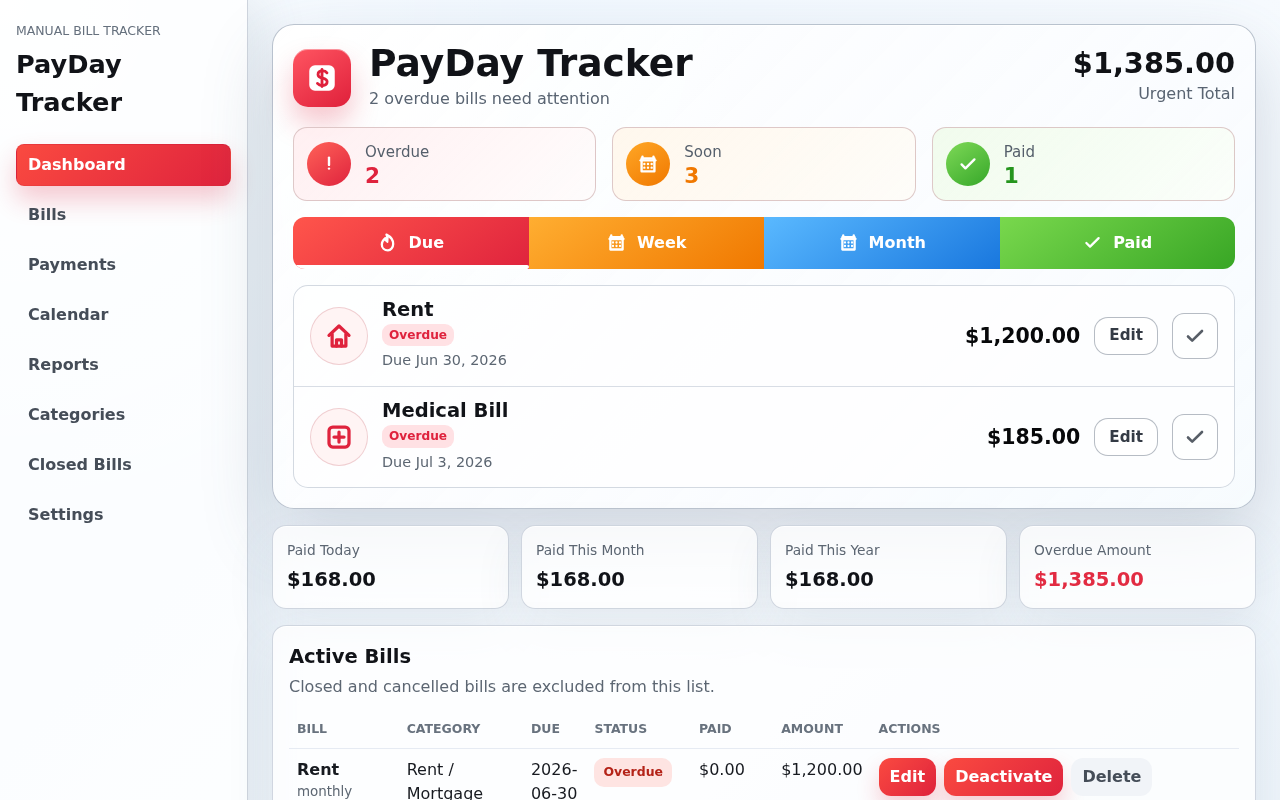
The dashboard view is valuable because it reduces scanning time. Users should not have to inspect multiple tabs to understand their situation. A good payment-management tool shows whether bills are active, upcoming, overdue, or already recorded so the next action is clear without extra searching.
If you are managing many categories of bills, this quick visibility matters even more. It helps you notice patterns such as:
- which due dates cluster in the same week
- which bills are most often recorded late
- which payments need receipt retention for verification
- which recurring items should have earlier reminders
Calendar planning makes the future easier to handle
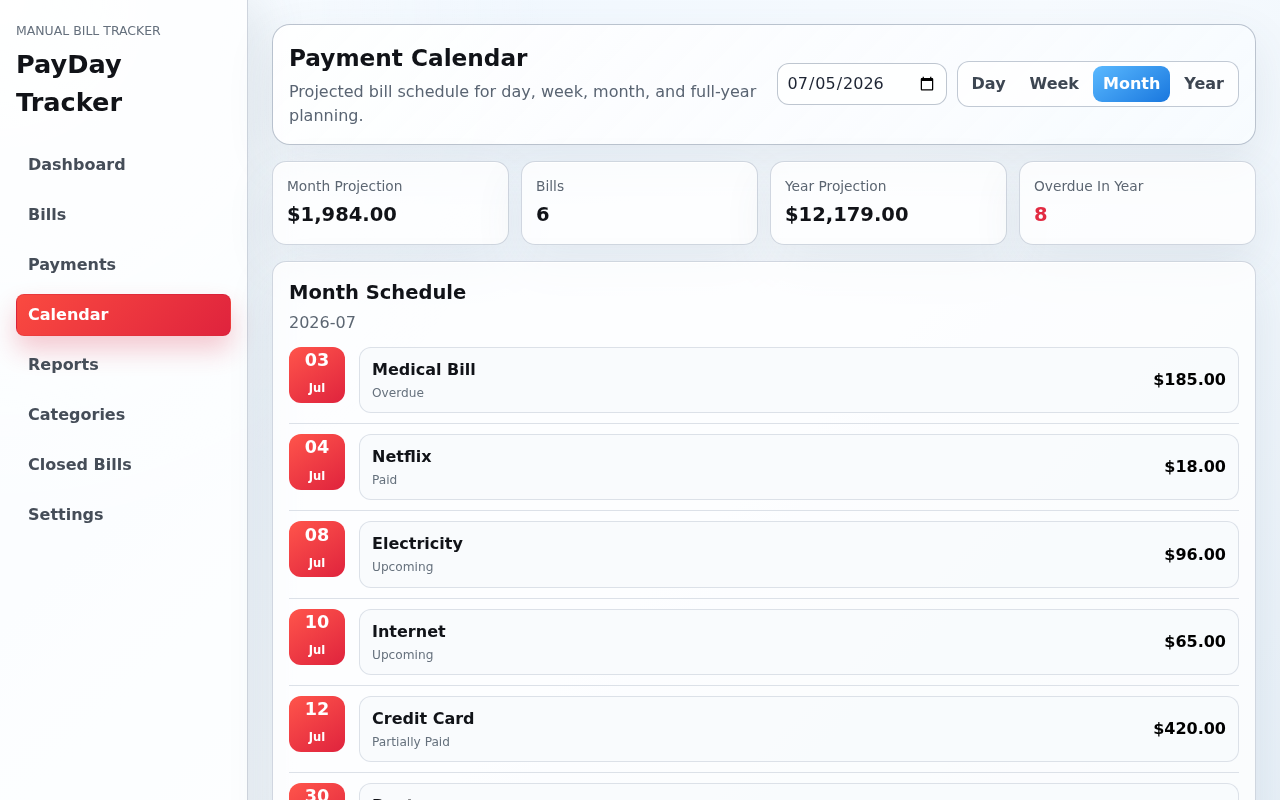
One of the most useful parts of PayDay Tracker is the calendar projection view. Looking at bills as isolated rows is helpful, but seeing them across time is what turns a list into a plan. A calendar view helps users anticipate heavier payment periods and prepare for them earlier.
This is especially helpful for users who manage:
- multiple family bills across the month
- small business or office utility cycles
- team subscriptions and recurring service renewals
- personal budgeting with uneven payment dates
How PayDay Tracker supports payment follow-up
Paying on time is only one part of bill management. The second part is proving and confirming what happened. Sometimes a payment goes through but a vendor asks for confirmation. Sometimes a family member needs to know whether something was already handled. Sometimes you need to review whether a particular month included a payment. A tracker becomes much more useful when it helps with this follow-up process too.
By keeping payment notes, dates, and optional receipts associated with the bill record, PayDay Tracker turns memory into a usable audit trail. It is not heavy finance software. It is a simpler operational record that helps ordinary people stay organized.
Who gets the most value from it
PayDay Tracker works especially well for users who need light-to-moderate payment organization without full accounting software. That includes:
- households managing rent, school, internet, and utility bills
- freelancers keeping track of recurring tools and service renewals
- small teams handling operational subscriptions and routine office expenses
- students or young professionals trying to build a better payment habit
- anyone who wants a simpler reminder-and-record flow in Chrome
What makes the product safer to understand
NHR Soft is careful about how PayDay Tracker is presented. The product is not described as a bank, wallet, payment processor, or financial adviser. It is a bill reminder and recordkeeping workflow tool. That clearer scope helps users understand exactly what the product does well and what it is not meant to replace.
If you want the full privacy and policy details before using it regularly, review the privacy policy and terms of service. Those pages explain the local-first model, optional backup-related permissions, and the intended role of the product more precisely.
A practical weekly routine with PayDay Tracker
For many users, the easiest way to stay on top of payments is a short weekly check-in rather than waiting for problems to appear. A practical routine might look like this:
- Open PayDay Tracker at the start of the week.
- Review upcoming due dates on the dashboard.
- Check the calendar for the next two weeks.
- Confirm which bills are already paid and record any missing payment status.
- Attach or update receipt references where needed.
- Adjust reminders if a bill is consistently being handled too late.
This routine only takes a few minutes, but it turns bill handling into a system instead of a scramble.
Why this matters for peace of mind
Good payment organization is not only about avoiding late fees. It is also about reducing mental load. When users trust their system, they spend less time rechecking old messages, searching gallery screenshots, or wondering if a payment was already done. That confidence is one of the most important benefits of a tool like PayDay Tracker.
Where to start
If you want to explore the product further, start with the PayDay Tracker home page. From there, review the product summary, screenshots, privacy page, and terms page. If you are evaluating it as a Chrome extension workflow, those pages give you a complete picture of what the tool is built to do.
FAQ
Does PayDay Tracker pay bills for me?
No. It helps you organize reminders, records, and receipts so you can manage payments more reliably yourself.
Can I use it for recurring family or office bills?
Yes. That is one of the most practical use cases, especially when you want a clear reminder-and-record process.
Why is the calendar view important?
Because it helps you plan ahead. Seeing due dates across time is often more useful than reviewing bills only as a static list.
How the screenshots connect to real daily use
The dashboard and calendar screenshots matter because they show two different parts of the same workflow. The dashboard helps you answer “what needs my attention now?” The calendar helps you answer “what is coming next?” Together, they support both immediate action and forward planning, which is exactly what most payment routines need.
Best results for new users
- enter only your most important recurring bills first instead of trying to migrate everything in one session
- set reminder timing based on how early you realistically need notice
- record payments immediately so your history remains trustworthy
- review the calendar weekly to avoid last-minute surprises
Why this article supports product discovery
Users searching for terms such as pay bills on time, bill reminder Chrome extension, payment tracker with receipts, or bill calendar planner are often trying to solve a practical everyday problem. This article is designed to connect that search intent to a real workflow, not just a product name.
Public Discussion
Name and Comment
Share your thoughts on this article. Your name and comment will be published right away on the page.
Published Comments
0
Start the conversation
No comments yet. Be the first person to leave a public note on this article.